
Who this guide is for: Anyone using expansive Insights for the first time.
What you'll learn
In this guide you'll learn:
- What expansive Insights is
- How to access the platform
- How your dashboards are organised
- The difference between official and custom dashboards
- Where to go next to start exploring your data
Welcome to expansive Insights
Expansive Insights is the reporting and analytics platform for expansive.
It gives you access to interactive dashboards and reports that help you understand what's happening across your estate, so you can monitor performance, investigate trends and make informed decisions.
Unlike static reports, Insights is designed to let you explore your data. You can apply filters, drill into charts and investigate individual work orders to answer operational questions as they arise.
Whether you're reviewing contractor performance, monitoring compliance, analysing work order demand or tracking financial performance, Insights gives you the flexibility to explore your data in the way that best suits your organisation.
Accessing expansive Insights
Once your account has been created, you'll receive an invitation to access expansive Insights.
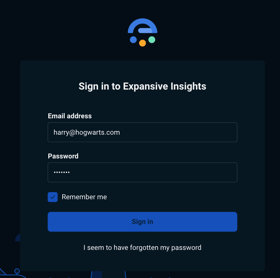
Sign in using the link provided by expansive and enter your login credentials.
Note: If you're unable to sign in, please contact your organisation's Insights administrator or the Eexpansive Service Desk.
Understanding your homepage
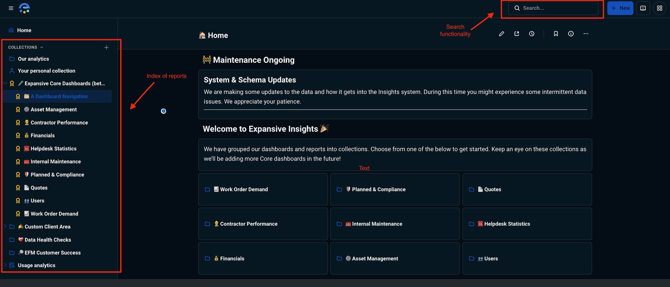
After signing in you'll arrive at the Insights homepage.
From here you can:
- Browse available dashboards
- Search for reports
- Access dashboards shared with your organisation
- View dashboards you've recently opened
- Create your own reports (if your permissions allow)
How your dashboards are organised
Dashboards are organised into Collections, making it easier to find the reports you need.
You'll typically see two types of collections.
Official dashboards
Official dashboards are created and maintained by expansive.
These dashboards contain the standard reports used across the platform and are regularly reviewed and improved.
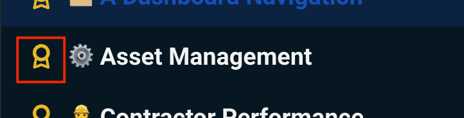
You can recognise them by the Official icon displayed next to the dashboard name.
Official dashboards can't be edited directly, ensuring everyone has access to a trusted version of each report.
Your organisation's collection
Your organisation also has its own collection.
This is where you'll find:
- Bespoke dashboards created specifically for your organisation
- Shared dashboards created by your team
- Copies of standard dashboards that have been customised for your reporting requirements
Unlike Official dashboards, these reports can be tailored to suit your organisation's needs.
Understanding permissions
The dashboards and data available to you are based on your user permissions.
You'll only see information that your organisation has authorised you to access, helping ensure data remains secure and relevant to your role.
If you believe you're missing a dashboard or can't access information you expect to see, please contact your Insights administrator.
Insights is designed to be interactive
One of the biggest differences between Insights and a traditional reporting tool is that the dashboards are designed to be explored.
As you use Insights you'll be able to:
- Filter dashboards to focus on the information that matters to you
- Click charts to investigate trends
- Drill down into the underlying records behind charts
- Explore work orders and operational data in more detail
- Build your own reports (where enabled)
Don't worry about learning everything at once - this knowledge base will guide you through each of these features step by step.
Next steps
Now that you're familiar with the basics, you're ready to start exploring your dashboards.
Continue to Navigating Dashboards to learn how dashboards are organised, how to find the reports you need and what the different dashboard types mean.
