
- Should users be using consolidated invoicing cycles, they can also set up automated cost approval
- To get started, users can head to the Configuration Variables area within Settings and set the 'Feature Flag Automatic Cost Approvals' to True
- Next, they can head back to Settings and select Roles and then the Permissions Group tab
- From here, they can select the relevant group they want to be able to manage or view the auto approval policies and add either or both of the below permissions:
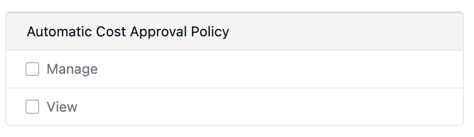 - Once the permissions are in place, those who can manage the auto approvals will see a new place within Settings called Automatic Cost Approval Policies
- Within this area users can view existing policies and add new policies in the top right
- From here, a form will appear where users can give the policy a name and mark it as active
- Users can then set a maximum value for auto-approval for each cost type and select the relevant currency to apply this to
- Further down the form, users can select whether to restrict the policy to certain work order types, or work order states. This is particularly helpful if users wanted auto approval for specific conditions such as planned or compliance work, or closed work orders
- The final section of the form allows users to select whether the approval policy should not run if it will result in budget overspend
- Once users have set up their policy, they need to apply it to an organisation. To do this, they can head to Settings and select the Organisation area
- Here, they can select the relevant organisation and choose the relevant policy from the dropdown on the auto approval field. It's worth noting, only one policy can be active at any one time for an Organisation
- When the policy is in place, when costs are submitted the approval policy will run and approve the costs if the relevant conditions are met, such as there are no cost auditing rule violations, and the relevant work order type and state is permitted for the policy
- Should the policy run and the costs are unable to be approved, a message will show that the costs were not automatically approved, alongside feedback as to why this happened
- Any activity around the auto approval will be reflected in the activity tab for easy auditing
- Users can also filter work orders for those where the auto approval has failed, so users can quickly address these where necessary
