
- Consolidated invoicing cycles allow users to choose a timeframe in which invoices are automatically created. After this, users can bulk approve costs from the same contractor, with the same invoice group and currency to the invoice which will be automatically closed on the selected cycle day
- For example, users can choose a weekly cycle, so every Friday this automatic invoicing process will run
If users want to utilise this feature, please reach out to support who can set this up for you. It's important to note, that at the moment, only weekly cycles are available. The cycle selected will apply to each contractor and cannot be tailored at contractor level.
- Once the feature has been enabled by Support, users can head to the contractor view screen and find the Billing tab
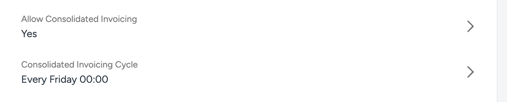
- From here, users can find the 'Allow Consolidated Invoicing' field and make sure it's set to Yes
- Beneath this field, they will then see the 'Consolidated Invoicing Cycle' field which they can select and choose a cycle from the dropdown
- Should users want to automate the whole process, they can also add an auto submit for costs to their workflow transition
Please get in touch with Support if you need help adding the below to your backend config in your workflow transitions:
{
  "auto_submit_costs": true,
}
